

I self-host Ghost because I like having control of the stack. But also means owning the problems when something goes wrong.
A while ago, my Ghost site started getting fake newsletter signups. At first, it looked like harmless bot noise. Then I checked the logs and found the more important problem: automated traffic was repeatedly triggering Ghost's membership email flow.
Fake members are mostly an annoyance.
Unwanted email is not. It can damage sender reputation, generate complaints, and make legitimate newsletters harder to deliver.
Ghost has acknowledged signup spam as a real problem, and the community has documented similar waves of fake registrations and membership-email abuse.
So I stopped treating it as a spam problem and started treating it as an application-security problem.
The security model
I am intentionally keeping the implementation high-level.
The current flow looks roughly like this:
Visitor
   ↓
Cloudflare
   ├─ WAF rules
   ├─ bot protection
   ├─ rate limiting
   └─ analytics
   ↓
Protected signup flow
   ├─ Turnstile
   ├─ server-side validation
   └─ abuse checks
   ↓
Ghost
   ↓
Mail provider
The goal is simple:
Reject junk before Ghost has to process it.
1. Put Ghost behind an edge layer
The biggest structural improvement was putting the site behind Cloudflare.
That gave me a place to filter obvious junk before it reached the origin:
- exploit probes
- abusive automation
- suspicious membership requests
- excessive non-static traffic
- repeat abusive sources
A CMS should spend its time serving content, not answering random PHP, WordPress, .env, debug, or framework probes.
Cloudflare's WAF, rate limiting, bot controls, and analytics removed a large amount of useless traffic without requiring changes to Ghost itself.
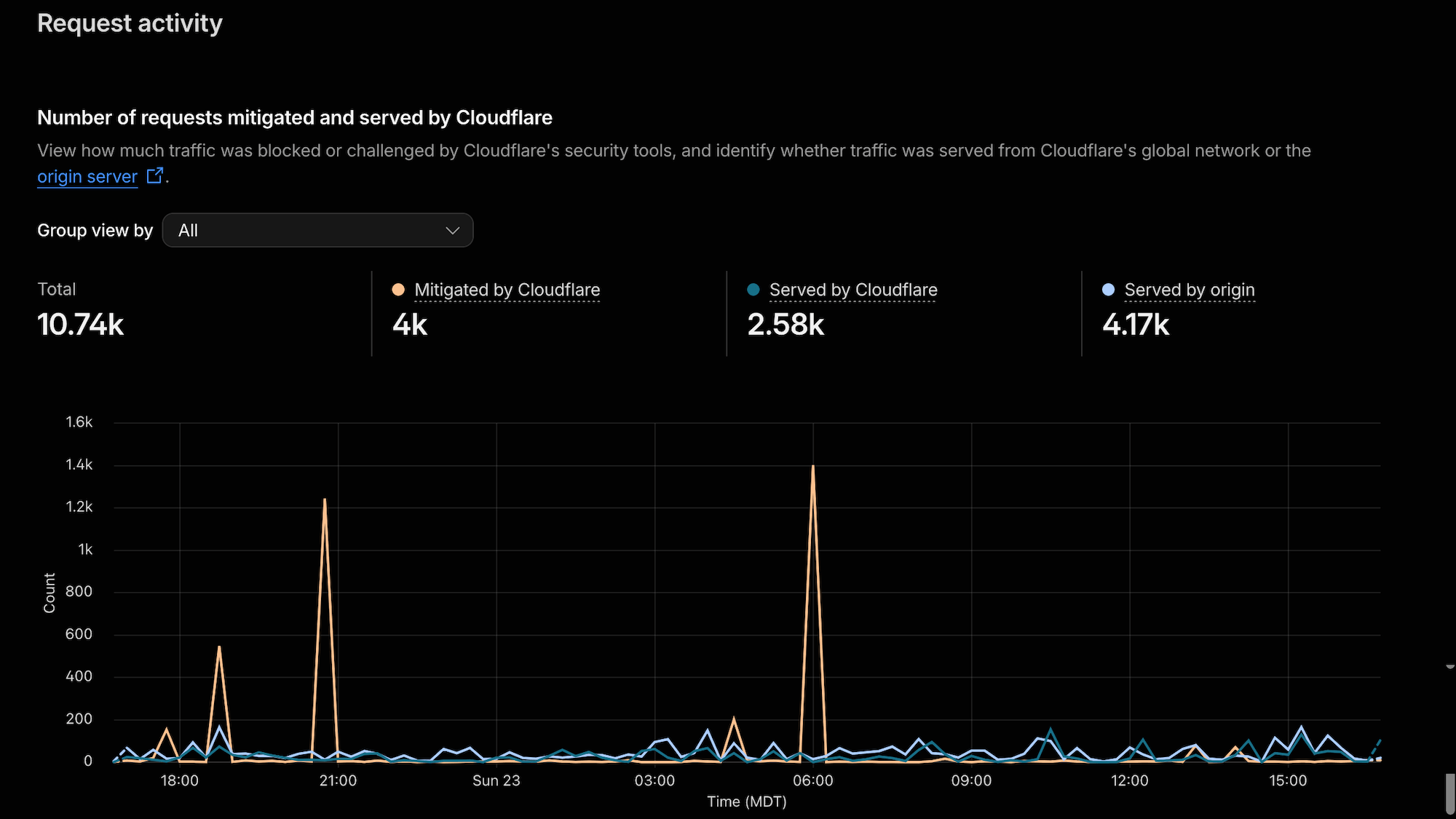
Cloudflare's Security Overview makes it much easier to separate normal traffic from requests being blocked or challenged at the edge.
2. Protect the action, not just the form
A signup form is only a user interface. Bots can bypass it and talk directly to the underlying endpoint.
So adding a challenge to the visible form is not enough.
I moved the public newsletter signup through a small Cloudflare Worker that:
- validates the request
- checks a honeypot
- verifies a Turnstile token server-side
- rejects malformed or suspicious requests
- forwards valid signups to Ghost
Cloudflare explicitly recommends server-side Turnstile validation.
The broader lesson matters more:
If the backend cannot verify that a security check happened, the check did not happen.
3. Block uncontrolled access to sensitive actions
Once the protected flow worked, I stopped allowing arbitrary traffic to trigger the same sensitive membership action directly.
I am deliberately not publishing the exact rules or verification mechanism.
The principle is enough:
If an action is supposed to come through a controlled application flow, make the uncontrolled path fail.
That immediately removed a large amount of low-effort abuse.
4. Prefer behavioral controls over giant IP blocklists
IP blocking helps, but it does not scale well.
Bot traffic rotates through cloud providers, proxies, IPv6 space, and disposable infrastructure.
I still block repeat offenders when they generate large amounts of obvious junk, but most useful protection comes from behavior:
- repeated sensitive requests
- abnormal request rates
- exploit scanning
- traffic that does not match the expected application flow
Cloudflare's rate-limiting guidance specifically recommends protecting account creation, authentication, APIs, and similar abuse-prone operations.
Patterns are more useful than chasing individual addresses.
5. Watch the origin, not just the traffic graph
One useful lesson from this process: a scary Cloudflare graph does not automatically mean the server is under heavy load.
Blocked requests still appear in analytics.
So this:
attacker
   ↓
Cloudflare
   ↓
BLOCK
can still produce a large traffic spike.
What matters more is what reaches Ghost.
The metrics I now watch are:
- total requests
- mitigated requests
- requests reaching the origin
- 5xx errors
- top paths
- top source networks
- cache status
- signup activity
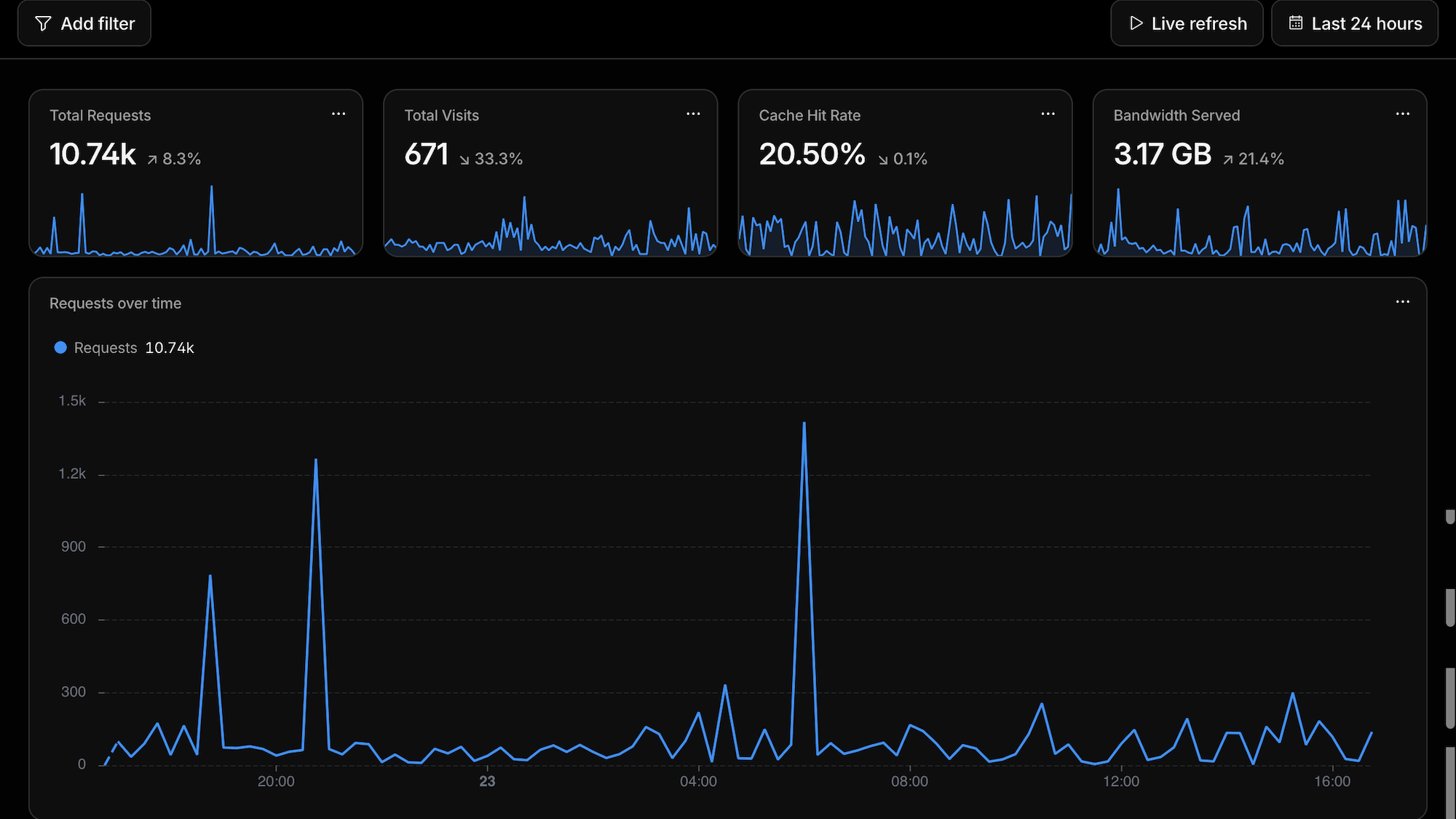
Traffic volume alone does not tell you whether the application is in trouble. Origin traffic, errors, cache behavior, and request patterns provide much more useful context.
A thousand blocked requests are less interesting than fifty suspicious requests reaching the application.
The goal is not a clean graph. The goal is a quiet origin.
6. Do not blindly block Ghost APIs
Several Ghost API paths appear frequently during normal traffic. That does not necessarily make them malicious.
Ghost uses its APIs for member state, newsletters, tiers, site settings, comments, Portal, Admin, and frontend behavior.
Blocking anything that looks like /api/ is a fast way to break your own site.
Before blocking something, look at:
method
path
user agent
frequency
country
ASN
response
security action
Then decide.
Security rules should be narrow enough that you know exactly why they exist.
7. Protect the origin too
A reverse proxy only helps if attackers actually have to go through it.
Cloudflare recommends protecting the origin so it cannot simply be reached directly.
For a self-hosted setup, review things like:
- exposed DNS records
- direct origin access
- firewall rules
- old hostnames pointing to the same server
- whether Cloudflare Tunnel makes sense
Cloudflare Tunnel is particularly interesting because it uses outbound-only connections from the server instead of requiring a publicly exposed web origin.
8. Treat email reputation as part of security
The attack changed how I think about email infrastructure.
I now review:
- bounces
- complaints
- suppressions
- delivery failures
- authentication records
- unusual signup-email volume
The important asset is not the member count.
It is the reputation of the domain sending the mail, especially when using Ghost's built-in Mailgun integration.
Ghost has been working on this too
Ghost published an official Signup spam protection update after publishers started seeing bulk spam registrations.
Community discussions have also documented fake-member floods and signup-email abuse.
There is ongoing work around Ghost's request-integrity protections as well. If you self-host Ghost, check your version, changelog, and current security options before building custom workarounds.
The answer is rarely one magic setting.
It is defense in depth.
If your Ghost site is getting fake signups
This is the order I would investigate it:
- Update Ghost.
- Check your mail logs.
- Put the site behind a reverse proxy or WAF.
- Inspect the actual requests.
- Protect signup actions server-side.
- Add narrow rate limits around sensitive operations.
- Block obvious exploit probes.
- Protect the origin from direct access.
- Watch the results for a few days.
- Only then add persistent IP or network blocks.
Visibility first. Controls second. Tuning last.
What I deliberately do not publish
I am not including:
- complete WAF expressions
- current IP or network blocklists
- Worker secrets
- validation headers
- bypass conditions
- internal logging identifiers
Security writing should explain the model without publishing a map of the defenses.
Nothing here makes the site "unhackable."
That is not the goal.
The goal is to remove cheap abuse paths, reduce unnecessary application work, protect sender reputation, and make suspicious behavior visible.
Final thought
Self-hosting is ownership. That is the appeal.
It also means dealing with the headaches.
The useful security model is not complicated:
reduce the attack surface
reject junk early
protect expensive actions
watch the origin
keep useful logs
The internet is noisy. A public server will be scanned.
The important question is not whether bots reach your domain.
It is what they can make your application do.
Sources and Further Reading
- Ghost — Signup spam protection
- Ghost Developer Docs — Security
- Ghost Forum — Observations about spam signups
- Ghost Forum — Ghost subscribe form hit by spam signups, hurting sender reputation
- Cloudflare Docs — Protect your origin server
- Cloudflare Docs — Custom WAF rules
- Cloudflare Docs — Rate limiting best practices
- Cloudflare Docs — Turnstile server-side validation
- Cloudflare Docs — Cloudflare Tunnel
You Might Also Like...
- Getting Started with Neovim and LazyVim on macOS
- OpenWrt + AdGuard Home + Brave (on a Cheap/Used Router)
- Resend Contact Form Template (Next.js 16 + React 19 Update)
- Getting Started with Neovim and LazyVim on macOS
- EzTube: A Clean Script-Based YouTube Downloader for macOS
- NeatDev: The Portfolio I Wish Existed (So I Built It For Free)